The short version
- Participant data is minimized by design — no raw IP addresses, no precise location, pseudonymous responses.
- Encrypted in transit (TLS) and at rest, with your third-party keys encrypted on top.
- We do not train AI models on your data, and neither do our AI providers on what we send them.
- You stay in control — export your data anytime; bring your own keys for AI, recruitment, and preregistration.
- Operator access is the exception, not the rule — read-only, reason-logged, never your participants’ raw responses, visible to you, and switch-off-able per workspace.
Where your data lives
Your study definitions, responses, and uploads are stored with vetted infrastructure providers. We keep a single, current list of every sub-processor and exactly what each can touch:
The in-app Privacy Policy carries the authoritative, always-current version of this list.
How participant privacy is protected
Personal data is collected as sparingly as possible:- No raw IP addresses are stored. For abuse-prevention we keep only a one-way hash of coarse request buckets.
- Only a coarse country is derived from requests — never precise location.
- User-agent strings are hashed, not stored raw.
- Responses are pseudonymous — tied to an opaque session/participant id, not to a name or email, unless your own study explicitly collects identifying answers (which is your design choice and your responsibility under your ethics approval).
Encryption
- In transit: all traffic is served over TLS/HTTPS.
- At rest: the database and file storage are encrypted by the infrastructure providers.
- Your third-party keys (OSF, Anthropic, Hume, Prolific) are encrypted at the application layer before storage, so a database snapshot never exposes them in the clear.
AI and your data
- We do not use your or your participants’ data to train any AI model.
- AI features run through providers (Anthropic for text; optionally Hume for voice/emotion) on a bring-your-own-key basis, and those providers do not train on data sent via their APIs.
- Voice/emotion AI is opt-in per study and shown to participants with consent.
Who can see your data
- You and the collaborators you invite — access is role-based per workspace (owner / admin / editor / viewer).
- Participants see only the study they’re taking.
- My Research Lab operators can use a read-only “View as” support tool — but it is deliberately constrained (see below).
Operator (“View as”) access — the constraints
For support and debugging, an administrator can briefly view the app as a researcher. It is designed to be a consent-and-audit tool, not a backdoor (see ADR-0082 in our architecture record):- Read-only — every change action is blocked while support access is active.
- Never your participants’ raw responses — operators see your study’s structure and settings, not response rows or exports.
- Reason-logged — entering requires a typed reason, and every enter/exit is recorded.
- Visible to you — you’re notified when it happens; it isn’t silent.
- Switch it off — a workspace can disable administrator support access entirely for sensitive work.
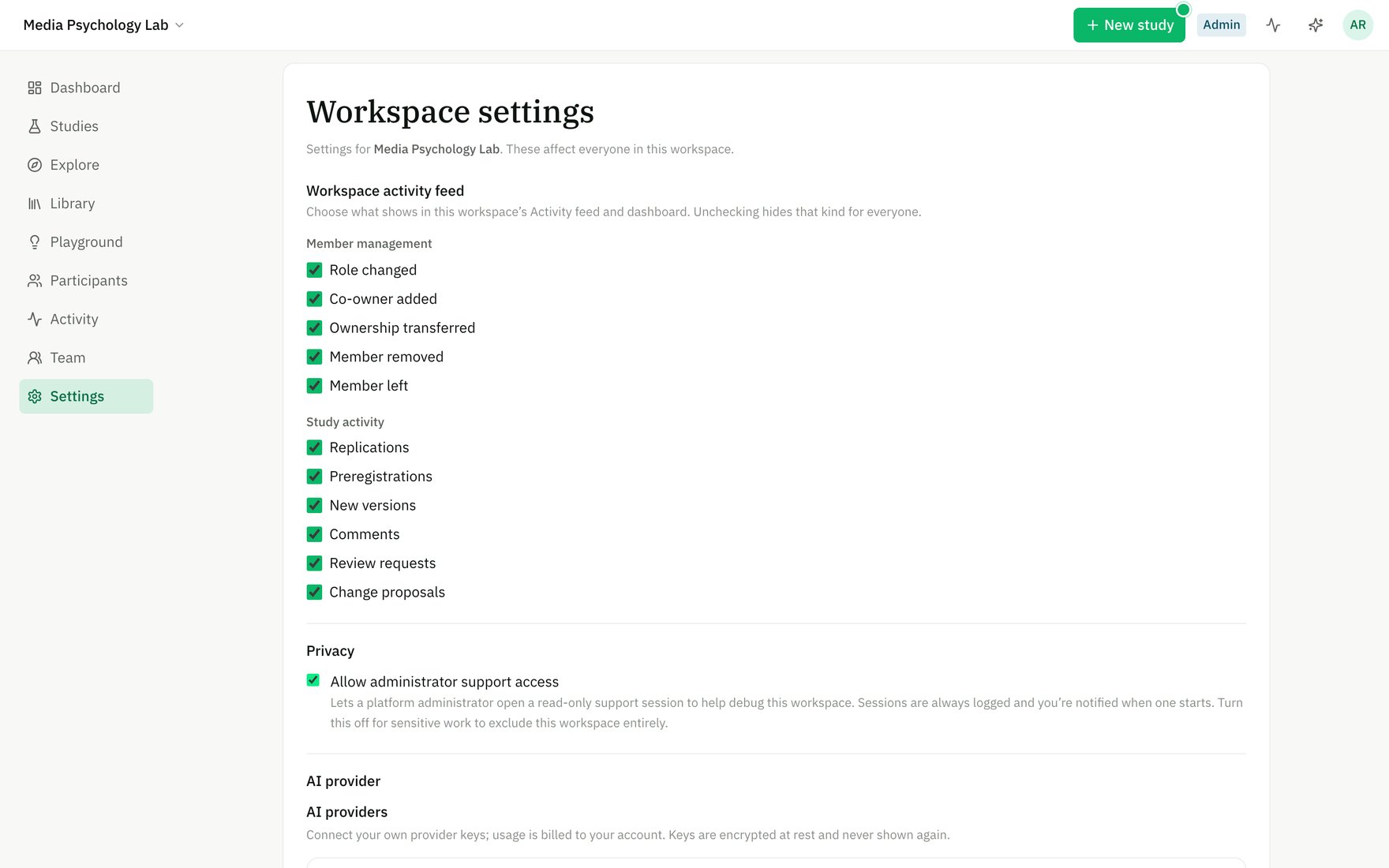
Workspace admins can switch off platform-operator support access entirely for sensitive work.
The controls you have
- Export your responses anytime (CSV + per-respondent views) for your own analysis.
- Bring your own keys for AI, recruitment, and preregistration, so the data path is yours.
- Preregister to OSF for open, timestamped science.
- Consent + withdrawal are first-class: consent screens, and participant withdrawal is honored across the app.
- Account email controls in Settings (engagement and marketing emails are independent, opt-in).
- Delete collected responses yourself, anytime — open a study’s Results stage and choose Delete collected responses. This permanently erases every response (completed, in-progress, and preview) while keeping the study design; it’s restricted to workspace owners/admins (or the study’s author) and confirmed by typing the study title. Automated retention windows and full study deletion are rolling out.
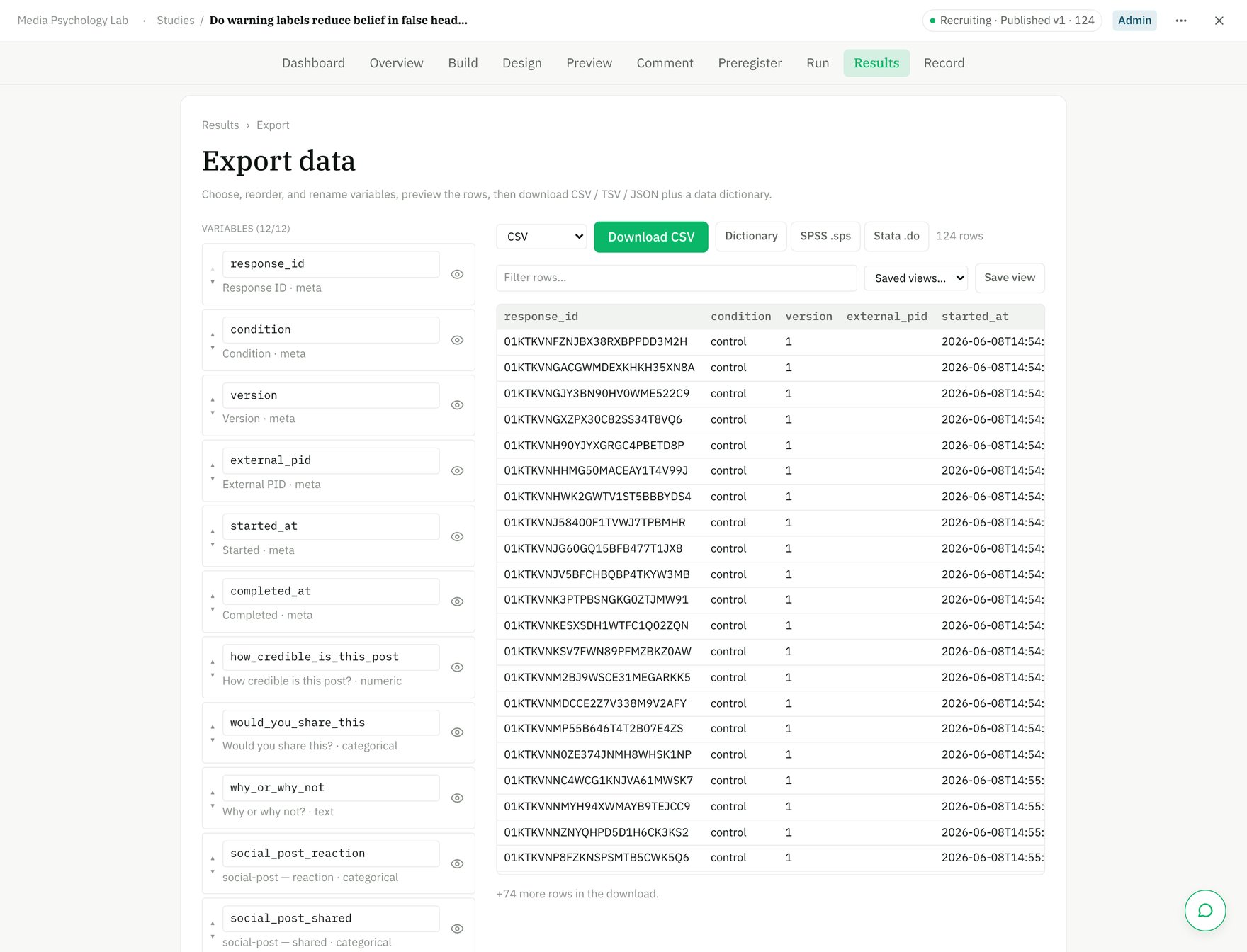
Export your dataset any time — choose, rename, and preview variables, then download CSV / SPSS / Stata.
Ethics & compliance
- The platform is built to support IRB/ethics-approved research — see our IRB checklist.
- Data handling is aligned with GDPR principles (minimization, purpose limitation, data-subject export/erasure on request).
- A Data Processing Agreement is available for institutions that require one.
Questions for your ethics board or data office that aren’t answered here? Send them through the in-app feedback widget — we’ll get you what you need.