Connect
Connect once, in Settings · Connections → OSF. Two paths are supported:Personal Access Token (PAT)
Generate a token at osf.io/settings/tokens with the
osf.full_write scope and paste it. We validate it against OSF before storing (a bad or wrong-scope token is rejected on the spot), then keep it encrypted. Works everywhere, including self-hosted.Sign in with OSF (OAuth)
If your My Research Lab instance has the OSF OAuth app configured, you can authorize via OSF directly. The OAuth flow requests the same
osf.full_write scope. When OAuth isn’t configured on the server, only the PAT path is shown.The connection is per researcher, not per workspace — it’s tied to your OSF identity, not your lab. When you push, your token creates the OSF project and you are its admin. Co-authors are added as contributors (see below). Disconnecting revokes the stored token; it is never shown again.
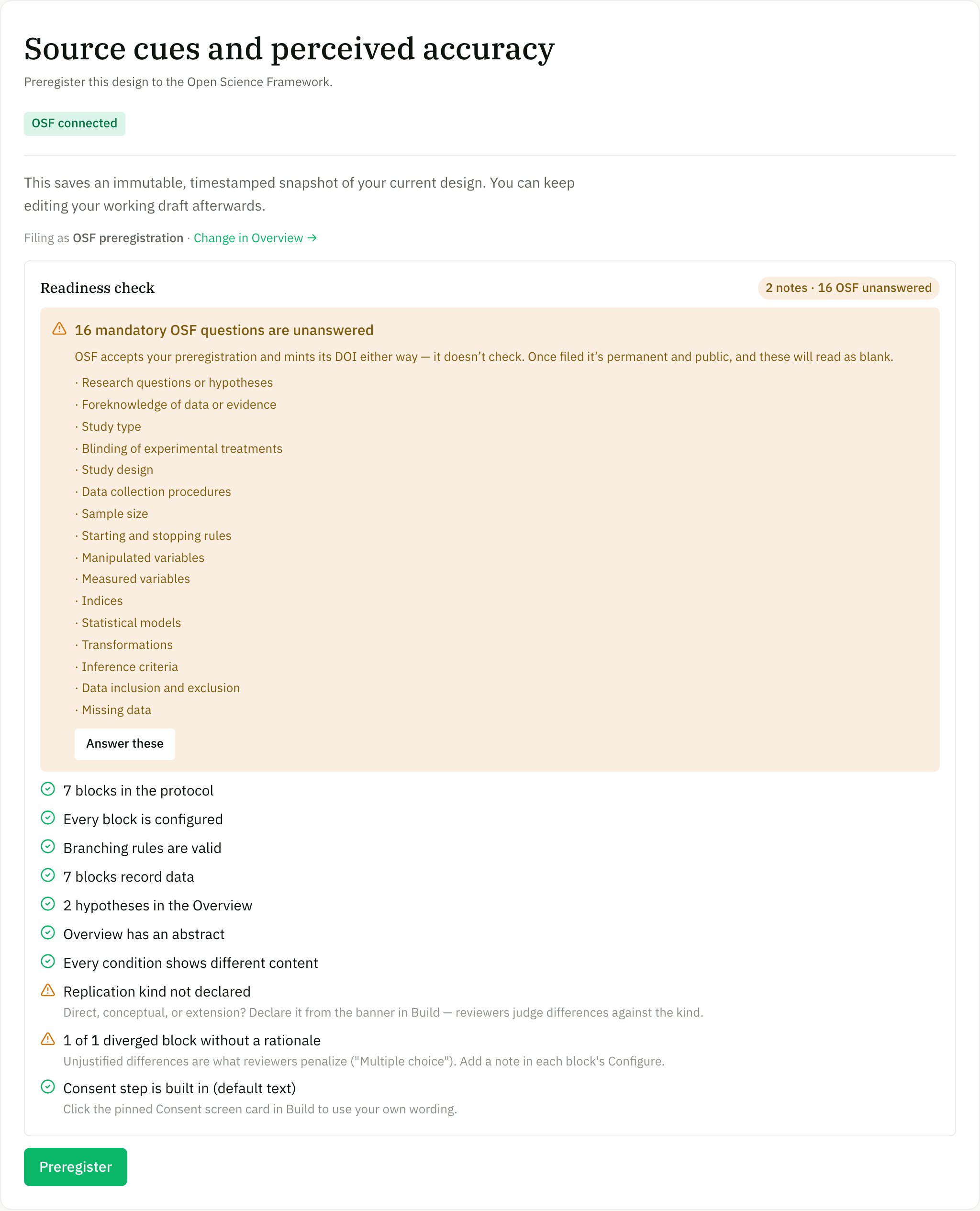
The Preregister stage — your OSF connection, the template you're filing under, and a readiness check that names every unanswered mandatory OSF question before you push.
What we push when you preregister
When you preregister a study, a background job sends the frozen version to OSF in this sequence:1
Create an OSF project node
A new private OSF project is created with your study title, and — when present — its description and tags. (Amendments reuse the original project rather than creating a new one.)
2
Add co-authors as contributors
Other active members of the workspace (everyone except you, the pusher) are added to the OSF project as unregistered contributors — by display name, with email if available, marked bibliographic, with write permission. We pass
send_email=false, so OSF doesn’t send them surprise claim emails. A contributor that fails to add never aborts the registration. Contributors are added only when the project is first created.3
File a draft registration
A draft registration is created under the project, bound to the OSF template you chose on the Overview stage — Open-ended, OSF Preregistration, Pre-data-collection (OSF standard), Social psychology, Secondary data, AsPredicted, or the Replication Recipe. The default is Open-Ended Registration (a single free-text summary field); a declared replication defaults to the Replication Recipe (Brandt et al., 2014) schema.
4
Fill the registration body
For a template with structured questions, we send your answers to that template’s questions, exactly as you wrote them on Overview — nothing is auto-filled or invented on your behalf. Hypotheses and variables you edited as lists are combined into the single text fields OSF expects. For the Open-Ended template, the summary instead carries, in human-readable form, your abstract, numbered hypotheses, your typed sampling plan, variables, expected outcomes, and analysis plan, and the auto-generated protocol (the ordered list of blocks/screens), followed by a machine-readable JSON design snapshot (the full version definition, module-version locks, and theme) so it’s a lossless record. Either way, two notes are appended automatically when they apply: a non-determinism disclosure if the study uses an AI conversation block, and a derivation disclosure (“how this plan was prepared”) naming any variables that were read from your built design — on by default, and you can turn it off on Overview.
5
Register immediately
The draft is registered with OSF’s
registration_choice: "immediate", which puts it into pending approval on OSF. You get the registration URL right away, and OSF normally mints the registration’s DOI within seconds — we store it immediately. Approval on OSF gates the registration becoming public, not the DOI.Exactly what reaches OSF
OSF does not enforce required fields — a registration answering none of them still succeeds and mints a permanent DOI, with the blanks filed as empty. So the only check is the Readiness check on the Preregister stage, which names every unanswered mandatory question but lets you file anyway (see Your research plan). Fill it in before you register.
What we don’t push
Be clear-eyed about the boundaries — a naive reading might assume more than the integration does:Some persistent identifiers live on your public record, not in the OSF push — your study’s language, its funders, and your affiliation’s ROR id. See Findability for how those are captured and surfaced.
Uploading materials to OSF
Separately from the preregistration, you can push your study’s materials to your OSF project — on demand, from the study’s Record. This uploads three kinds of file:- Your stimulus files — the images, audio, and video your study uses (from your Materials library). Participant-contributed media is never included.
design-snapshot.json— the machine-readable study definition (the same lossless snapshot the registration embeds), as a standalone file.protocol.pdf— a human-readable study document (title, authors, abstract, hypotheses, method, and block list).
Materials go into a folder on your editable OSF project, not into the frozen registration — OSF registrations are immutable, so files can’t be added to them. If you upload materials before you register, the registration snapshots them; you can also upload (or re-upload) any time after. Files inherit the project’s privacy — private unless you make the project public.
Amendments vs. record updates
After your first successful push, the app treats two kinds of change very differently:-
Plan amendment — you changed the registered plan and re-preregister. We detect that an earlier version of the same study was already pushed, and file a new registration on the same OSF project. My Research Lab records the amendment lineage against the study — your stated reason (from the amendment dialog) and an auto-generated list of changes since the prior registration — and for Open-Ended and Replication Recipe filings that lineage is also written into the OSF registration text as an
AMENDMENT — supersedes …header. The original registration is never altered — both stay on the record. Contributors are not re-added (they already exist on the reused project). - Record update (non-plan) — you edited the public study record (abstract, article link) after preregistering. That does not create a new registration. It PATCHes the OSF project’s description only, leaving the frozen registration untouched.
This distinction is the whole point: the timestamped plan is immutable, amendments are honest supersessions on the record, and cosmetic record edits never masquerade as changes to the plan.
The OSF watch
My Research Lab periodically polls your pushed registrations and reflects two things back into the study:- DOI backfill — the DOI is normally captured at push time; if it wasn’t, the watch reads it from the registration and stores it against the version, so your citation resolves.
- Withdrawal — if a registration is withdrawn/retracted on OSF, the watch marks the version as withdrawn and notifies you. (OSF keeps a public tombstone — title, contributors, justification — after withdrawal.)