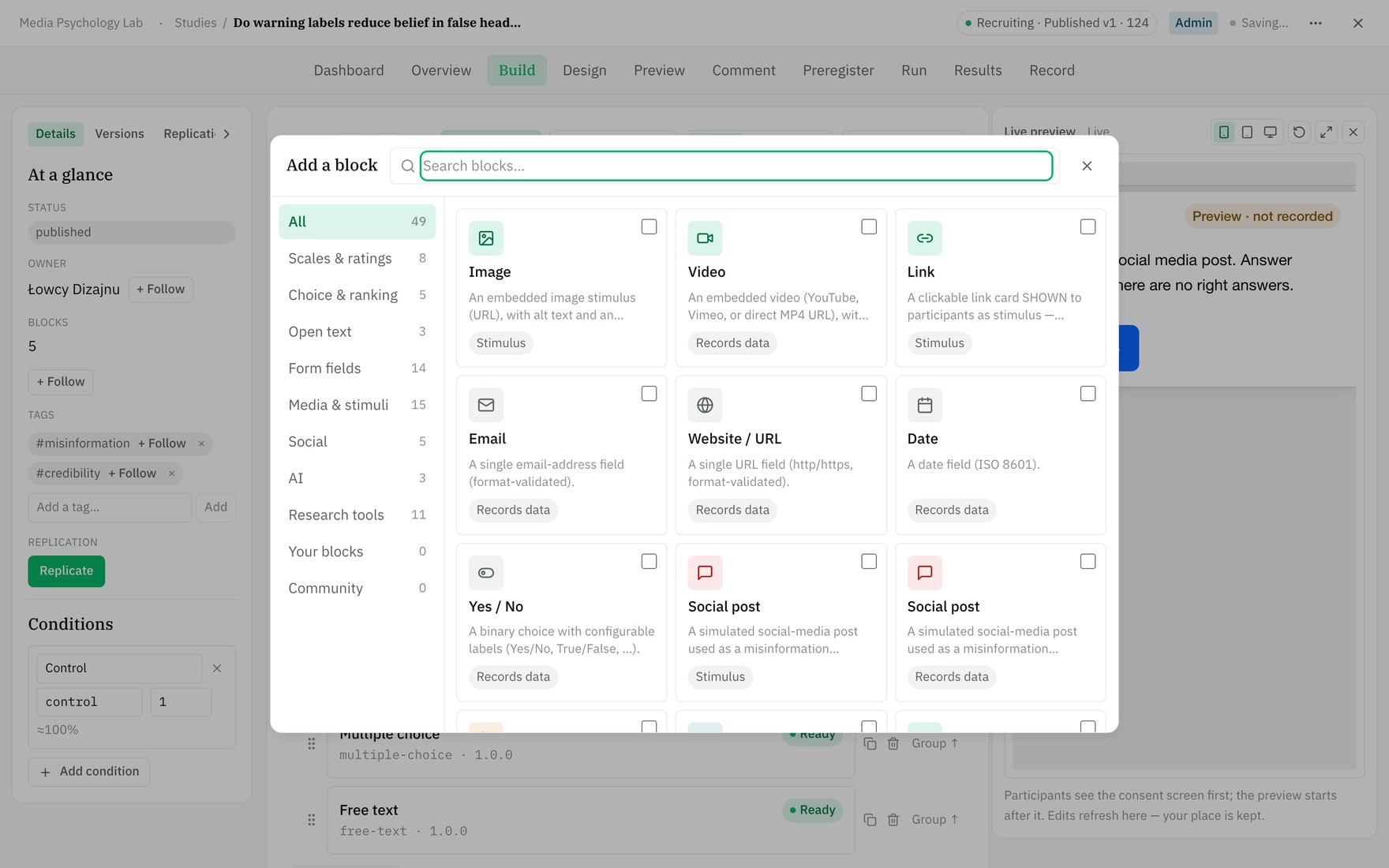
The block picker — 49 blocks grouped by what they do: scales, choices, stimuli, media, forms, AI, and flow.
Core questions & scales
Fundamental measurement blocks for self-report scales, choices, and ratings — the bread-and-butter of behavioral research.Multiple choice
Multiple choice
Single- or multi-select choice question with researcher-defined options. Records data: ✓ (usable as a condition source).Key options:
prompt — question text; options — list of choices; multiple — allow checking multiple options; required — gate on a response; randomizeOrder — shuffle option order per participant.Use it when you need to collect a categorical response with 2+ options.Likert (7-point)
Likert (7-point)
A 7-point agreement scale with left/right anchor labels — the standard manipulation check. Records data: ✓ (usable as a condition source).Key options:
prompt — statement to rate; leftAnchor — label for point 1 (e.g., “Strongly disagree”); rightAnchor — label for point 7 (e.g., “Strongly agree”); required — gate on a response.Use it when you need a quick agreement or perception measure.Free text
Free text
Open-ended text response — a short line or long paragraph, optionally analyzed for emotion by Claude. Records data: ✓ (usable as a condition source).Key options:
prompt — instruction; longForm — textarea instead of single-line input; maxLength — hard cap (1–10,000 chars); required — gate on a response; emotionAnalysis — enable Claude emotion scoring (exploratory).Use it when you want qualitative feedback, explanations, or open reasoning.Slider
Slider
A numeric slider over a researcher-set min/max range. Records data: ✓ (usable as a condition source).Key options:
prompt — instruction; min — lower bound; max — upper bound; step — increment granularity; required — gate on a response.Use it when you need a precise numeric response in a continuous range.Visual analog scale
Visual analog scale
A continuous slider between two labeled anchors — respondents mark their position on a spectrum. Records data: ✓ (usable as a condition source).Key options:
prompt — instruction; min — left bound; max — right bound; leftLabel — left endpoint text; rightLabel — right endpoint text; required — gate on a response.Use it when you need a fine-grained subjective rating anchored to opposing concepts.Dropdown
Dropdown
Single-select dropdown — good for long option lists that would clutter the page. Records data: ✓ (usable as a condition source).Key options:
prompt — question; options — list of choices; required — gate on a response.Use it when you have 6+ options and want to save vertical space.Yes / No
Yes / No
A binary choice with configurable labels (Yes/No, True/False, Agree/Disagree, etc.). Records data: ✓ (usable as a condition source).Key options:
prompt — question; yesLabel — label for the positive button (default: “Yes”); noLabel — label for the negative button (default: “No”); required — gate on a response.Use it when you need a simple binary judgment.Star rating
Star rating
A 1-to-N star rating — customizable from 2 to 10 stars. Records data: ✓ (usable as a condition source).Key options:
prompt — instruction; max — number of stars (2–10); required — gate on a response.Use it when you want a quick satisfaction or quality rating.Net Promoter Score (0–10)
Net Promoter Score (0–10)
An 11-point 0–10 likelihood-to-recommend scale — the standard NPS measure. Records data: ✓ (usable as a condition source).Key options:
prompt — typically “How likely are you to recommend this?”; leftLabel — label for 0 (default: “Not at all likely”); rightLabel — label for 10 (default: “Extremely likely”); required — gate on a response.Use it when you need an NPS or similar 0–10 likelihood metric.Ranking
Ranking
Order a set of items by preference, priority, or importance — participants drag to rank. Records data: ✓ (usable as a condition source).Key options:
prompt — instruction (e.g., “Rank by preference”); items — list of things to rank (≥2); required — gate on a complete ranking.Use it when you need to measure preference ordering or relative priority.MaxDiff (best–worst)
MaxDiff (best–worst)
Best-worst scaling: from a set of items, pick the best and the worst — a lightweight alternative to full ranking. Records data: ✓ (usable as a condition source).Key options:
prompt — instruction; items — list of items to choose from (≥2); required — gate on both selections.Use it when you want preference data without full ranking overhead.Matrix / grid
Matrix / grid
A grid of statements (rows) each rated on a shared scale (columns) — efficient for multi-item scales. Records data: ✓ (usable as a condition source).Key options:
prompt — intro text; rows — list of statements; columns — shared scale labels (e.g., “Disagree”, “Neutral”, “Agree”); required — gate on all rows answered.Use it when you have multiple related items all using the same response scale (e.g., multi-item psychology scales).Side by side
Side by side
Several sub-questions in one condensed table — each row is rated across multiple different columns. Records data: ✓ (usable as a condition source).Key options:
prompt — intro; rows — items to rate; columns — each column has its own label and scale options (can differ per column); required — gate on all cells answered.Use it when you want to ask multiple questions per item but save space by putting them side-by-side.Semantic differential
Semantic differential
Bipolar adjective pairs (left vs right) each rated on a 1–N scale — classic psychology measure. Records data: ✓ (usable as a condition source).Key options:
prompt — intro; points — scale width (2–11 points); leftLabels — left adjectives (e.g., “Bad”, “Weak”); rightLabels — right adjectives (e.g., “Good”, “Strong”); required — gate on all pairs answered.Use it when you’re measuring connotations or semantic associations (e.g., brand perception via good–bad, modern–old).Picture choice
Picture choice
Image-based options — paste image URLs and let participants pick one or more. Records data: ✓ (usable as a condition source).Key options:
prompt — instruction; imageUrls — list of image URLs; multiple — allow multi-select; required — gate on a selection.Use it when you want to present visual options (designs, faces, products, etc.) for choice or preference.Judgment & misinformation
Specialized blocks for measuring judgment accuracy, behavioral intentions, and belief strength in misinformation and bias research.Accuracy + confidence
Accuracy + confidence
A categorical judgment (e.g. real vs. fake) paired with a confidence rating in one block—the metacognition measure central to misinformation research. Records data: ✓ (usable as a condition source).Key options:
options — the judgment choices (e.g. [“Accurate”, “Inaccurate”]); confidenceLabel — prompt for the confidence rating; confidenceMax — upper bound of the confidence scale (default 100).Use it when you need both accuracy and confidence, not just the binary choice alone.Constant sum
Constant sum
Allocate a fixed budget (points or %) across options that must add up to a target total—enforced at submit. Records data: ✓ (usable as a condition source).Key options:
items — the allocation targets; total — the sum participants must hit (default 100); unit — the label (e.g. “points” or ”%”).Use it when you need forced trade-offs or belief strength across mutually-constraining options.Drill down
Drill down
Cascading dependent dropdowns (e.g. country → region → city)—each level’s options depend on the selection above. Records the chosen path. Records data: ✓ (usable as a condition source).Key options:
levelLabels — labels for each nesting level; options — tree structure with parent labels and their children.Use it when you need hierarchical selection with dependent levels or geographic/taxonomic response structures.Behavioral & timing
Blocks that measure behavioral responses, enforce timing constraints, or check data quality through timed tasks.Reaction time
Reaction time
Measures response latency (milliseconds) after a stimulus appears following a random delay. Records data: ✓ (usable as a condition source).Key options:
prompt — instruction shown to the participant; stimulus — the word/text displayed to respond to; minDelayMs — minimum wait before stimulus appears (0–60000 ms); maxDelayMs — maximum delay (0–60000 ms).Use it when you need precise reaction-time measurements in cognitive or attention tasks.Timed exposure
Timed exposure
Show a stimulus (text and/or image) for exactly N milliseconds, then hide it — the limited-exposure paradigm for memory and misinformation studies. Records the actual display time (client-measured). Records data: ✓ (usable as a condition source).Key options:
content — text to display; imageUrl — optional image URL; exposureMs — duration in milliseconds (positive integer).Use it when you need controlled, brief exposure to a stimulus (e.g., a social post, headline, or misleading claim) before measuring downstream judgments.Forced wait
Forced wait
Disable the Continue button for N seconds so participants spend a minimum time on a screen. Records how long they actually waited (client-measured). Records data: ✓ (usable as a condition source).Key options:
content — text shown while waiting; waitSeconds — mandatory wait duration in seconds (positive integer).Use it when you want to ensure participants spend time reading instructions, a stimulus, or disclosure text before proceeding.Attention check
Attention check
An instructed-response attention check (single-select with a known correct answer) for screening data quality. Participants must select the right option. Records data: ✓ (usable as a condition source).Key options:
prompt — the instruction (e.g., “Select ‘Strongly agree’ to show you are paying attention”); options — list of answer choices; correctAnswer — the right answer (one of the options).Use it when you need to flag inattentive participants and filter low-quality responses before analysis.Image interaction
Interactive blocks where participants click, drag, or mark on images to record positions, selections, or ratings.Heat map
Heat map
Participants click anywhere on an image to mark points of interest (e.g., where their eye went on a post or ad). Records all clicked points as normalized coordinates. Records data: ✓ (usable as a condition source).Key options:
imageUrl — the image to click on; maxPoints — max clicks allowed (default 10); required — whether the block gates on ≥1 point.Use it when you want participants to identify multiple locations of interest on a stimulus (visual attention, usability testing, image markup).Hot spot
Hot spot
Predefined clickable regions on an image — participants select which region(s) apply. Each region can show a visible outline or be invisible-but-clickable, and can trigger record, link, advance, or branching actions. Records data: ✓ (usable as a condition source).Key options:
imageUrl — the image to add regions to; regions — array of clickable areas with labels, position/size, and optional actions; multiple — single or multi-select mode; required — whether ≥1 region must be selected.Use it when you want participants to identify specific parts of an image (misleading sections of a post, UI elements, problem areas) and optionally trigger follow-up actions or set conditional values.Graphic slider
Graphic slider
Drag a marker along an image to give a position-based rating. Records the marker position as a normalized 0–1 value. Records data: ✓ (usable as a condition source).Key options:
imageUrl — the image that serves as the slider track; required — whether a position must be set before continuing.Use it when you want a continuous rating tied to visual content (e.g., mood along a time series, preference across a spectrum, position on a visual scale).Stimuli (no answer)
Blocks that display content to participants without collecting a response — use them for instructions, examples, and media stimuli.Text
Text
Present instructional or narrative text (supports markdown formatting). Records data: — (stimulus/flow only).Key options:
contentMd — the text content, with markdown support for formatting.Use it when you need to provide instructions, context, or narrative between other questions.Image
Image
Display an image stimulus with accessibility text and an optional caption. Records data: — (stimulus/flow only).Key options:
url — image location (external HTTPS or uploaded asset); alt — alt text for accessibility; caption — optional text shown below the image.Use it when you’re showing a visual stimulus (screenshot, artwork, design mockup) that participants view but do not respond to.Video
Video
Embed a video (YouTube, Vimeo, or direct MP4 URL) with optional caption and watch-enforcement. Records data: — (watch tracking only; exposure is always recorded, full watch when
requireFullWatch is true).Key options: url — video location; caption — optional text below the player; requireFullWatch — gate the Continue button until participants finish playback (enforced on direct files; advisory on embeds).Use it when participants need to view a video stimulus, with optional enforcement that they watch it completely before moving on.Link preview
Link preview
Display a clickable link card shown as stimulus — does not ask participants to enter a URL. (For collecting a URL answer, use Website / URL.) Records data: — (stimulus/flow only).Key options:
url — the link target; title — card headline; description — preview text.Use it when you want to show a reference or resource as a stimulus without requesting a response.Notification
Notification
Show an in-context notification (banner/toast) — a type, optional call-to-action buttons, and an optional close — configured in a live-preview editor. Records data: which action the participant took (dismissed / clicked a CTA / ignored); never blocks Continue.Key options:
variant — error / warning / info / success / custom (custom imitates a real system notice and adds a left thumbnail); title, body — the text; ctas — up to 2 buttons, each linking to an external URL (new tab) or another study; dismissable — show a ✕; position — inline or fixed to the top; triggerKind — show when the screen opens, after a delay, or when a condition is met (via Show this block when); deceptionAck — required IRB attestation for the custom variant.Use it when you want to study reactions to alerts, nudges, or (with the custom variant) a simulated system notice. The custom variant is a deception — the study can’t go live until you confirm your ethics approval covers it.Modal dialog
Modal dialog
Show a centered pop-up dialog over a backdrop — a title, text, an optional image, and up to two buttons — configured in a live-preview editor. Records data: which action the participant took (advanced / stayed / clicked a button / dismissed); never blocks Continue by itself.Key options:
title, body — the dialog text; imageUrl + imagePosition — an optional image (top / left / right); ctas — up to 2 buttons, each an Advance (close and go to the next screen), Stay (close only), External link, Another study, or This study — a screen; dismissable — allow ✕ or Esc to close (a click on the backdrop does not close it); triggerKind — show when the screen opens, after a delay, or when a condition is met; imitatesReal + deceptionAck — the IRB attestation required when the modal imitates a real product’s dialog.Use it when you need a consent/cookie/paywall/system-dialog paradigm, or any pop-up that advances the study or offers a choice. If it imitates a real product it’s a deception — the study can’t go live until you confirm ethics approval. A non-closable modal must include an Advance button so participants aren’t trapped. Placed alone on a screen, the modal pops over the previous screen’s content.Login screen
Login screen
Show a realistic sign-in screen — a brand, username + password fields, a sign-in button, and optional single-sign-on buttons — for phishing-susceptibility and deception-in-context research, configured in a live-preview editor. Privacy — records data: only the participant’s action (sign-in / SSO / ignored), its timing, and whether they typed into each field. What they type into the username and password fields is never recorded — those inputs are never submitted or stored.Key options:
brandName + logo; title, subtitle; the username / password field labels + placeholders; submitLabel; ssoProviders — which “Continue with …” buttons to show (Google / Facebook / Apple / Microsoft / X / generic); showForgot, showSignup — optional links; triggerKind — show when the screen opens, after a delay, or when a condition is met; imitatesReal + deceptionAck — the IRB attestation (on by default — a credential prompt is deception by design).Use it when you’re studying whether participants would enter credentials into a given screen. The Sign-in and SSO buttons advance the study; the screen’s own Continue is the escape for participants who won’t log in.Audio stimulus (AI voice)
Audio stimulus (AI voice)
Play a spoken stimulus generated from your script using Hume Octave text-to-speech. Write the words and a delivery direction (e.g. “anxious, urgent newsreader”); the system generates and caches the audio. Records data: — (stimulus/flow only).Key options:
script — the text to speak; description — acting direction that shapes prosody; playback — once (play once, auto-advance), replayable (participant may replay), or forced (gate Continue until listened through); audioUrl, audioHash — auto-generated after TTS (hidden from manual config).Use it when you want to deliver voice-based stimulus (instructions, testimony, news clip) with natural prosody shaped by your direction, using your workspace’s Hume API key.Media capture
Blocks for capturing participant-recorded media and files.Audio recording
Audio recording
Participants record a spoken answer via microphone with a researcher-set time limit. Records data: ✓ (usable as a condition source).Key options:
prompt — the question or instruction; maxDurationSeconds — time limit (5–300 seconds); required — whether participants must record; emotionAnalysis — optional Claude scoring of emotion in the voice.Use it when you need spoken responses, open-ended voice feedback, or prosody-sensitive measurements.Video recording
Video recording
Participants record a short video response from their camera (with consent). Video is stored privately and retrievable via export. Records data: ✓ (usable as a condition source).Key options:
prompt — the instruction; maxDurationSeconds — time limit (5–300 seconds); required — whether recording is required.Use it when you need to capture behavioral responses, facial expressions, body language, or on-camera performance.File upload
File upload
Participants upload a file (PDF, document, spreadsheet, image, or zip). Files are stored privately, listed in your export, and downloadable as anti-XSS downloads. Records data: ✓ (usable as a condition source).Key options:
prompt — the upload instruction; required — whether upload is required.Use it when you want participants to submit portfolios, writing samples, consent forms, spreadsheets, or other documents.Signature
Signature
Participants sign on a canvas; the signature image is stored privately and included in your export. Typically used for consent records. Records data: ✓ (usable as a condition source).Key options:
prompt — the signing instruction; required — whether the signature is required.Use it when you need a signed consent acknowledgment, legal signature, or a drawn attestation from the participant.Forms & contact
Dedicated blocks for capturing structured data from participants — contact details, numbers, dates, and custom multi-field forms.Number
Number
Collect a numeric value with optional min/max constraints and a unit label (e.g., “years”, “USD”). Records data: ✓ (usable as a condition source).Key options:
prompt — the question or label; required — whether the field must be filled; min, max — bounds for the entry (validated server-side); unit — suffix shown after the input (e.g., “kg” or ”%”).Use it when you need a simple numeric answer (age, count, score) with optional range checks.Date
Date
Capture a date in ISO 8601 format (YYYY-MM-DD), with client validation. Records data: ✓ (usable as a condition source).Key options:
prompt — the question; required — whether the field must be filled.Use it when you need a full date entry (birthday, event date) parsed and validated.Email
Single email-address field with format validation (basic regex check for name@domain.tld). Records data: ✓ (usable as a condition source).Key options:
prompt — the question; required — whether the field must be filled.Use it when you need a valid email for follow-up or contact purposes.Phone number
Phone number
Phone-number field with light E.164-style validation (accepts +country codes and formatting like spaces/dashes). Records data: ✓ (usable as a condition source).Key options:
prompt — the question; required — whether the field must be filled.Use it when you need a phone number for recruitment or callback.Website / URL
Website / URL
URL field requiring http:// or https:// prefix; validates the scheme and format. Records data: ✓ (usable as a condition source).Key options:
prompt — the question; required — whether the field must be filled.Use it when you ask participants to provide a web address (not to link them to one — use Link preview for stimulus).Address
Address
Structured postal address with separate fields for street, city, state, postal code, and country — all optional. Records data: ✓ (usable as a condition source).Key options:
prompt — the question; required — whether at least one field must be filled.Use it when you need a participant’s mailing address, either fully or partially completed.Contact info
Contact info
Compact form collecting name + email (+ optional phone) on a single screen; email is format-validated. Records data: ✓ (usable as a condition source).Key options:
prompt — the question; required — at least name and email must be provided.Use it when you need quick contact details without a separate address block.Custom field group
Custom field group
One card where you add, remove, relabel, and type each sub-field (text, number, email, phone, date, dropdown, yes–no); records one structured answer. Records data: ✓ (usable as a condition source).Key options:
prompt — the question or label for the whole group; required — whether all marked-required sub-fields must be filled; fields — array of field specs (each with a key, label, type, optional required, and optional dropdown options).Use it when you need a flexible multi-field form tailored to your study — e.g., an editable version of Address with custom labels.AI
Interact with Claude as a participant in your flow, or measure emotion in written responses.AI conversation
AI conversation
A live chat interface where participants converse with Claude in a role and context you define; the full message transcript is recorded as the answer. Records data: ✓ (usable as a condition source).Key options:
role — the AI’s role/persona; context — background information or instructions Claude reads before each response; openingMessage — the first message participants see; model — which Claude model to use (Opus 4.8, Sonnet 4.6, or Haiku 4.5); maxTurns — maximum conversation exchanges (1–50); timeLimitSec — optional wall-clock limit on the conversation in seconds (0 = unlimited).Use it when you want structured, conversational data collection (e.g., elicitation interviews, Socratic probing, open reasoning capture).Text emotion probe
Text emotion probe
Participants type a response; Claude analyzes the emotion expressed in their words using the Plutchik-8 model (exploratory). Emotion scoring is always on — emotion is the measure. Records data: ✓ (usable as a condition source).Key options:
prompt — the question; longForm — toggle for multiline textarea vs. single line; required — whether the field must be filled; maxLength — character limit (1–10,000); emotionAnalysis — always enabled; provider and modality are locked to Claude text analysis.Use it when you want to measure affect or sentiment in open-ended written responses without manual coding.Flow & quality
Specialized blocks for study flow control and data integrity — capture recruitment metadata and route completers back to platforms.Embedded data
Embedded data
Capture specific URL parameters (e.g., Prolific PID, experimental condition, traffic source) into the response for panel reconciliation and participant tracking. Records data: — (metadata only, not shown to participants).Key options:
params — list of URL parameter names to capture (default-deny; only named params are stored).Use it when you need to link participant responses to external recruitment data or session context.End redirect
End redirect
Route study completers back to a recruitment platform (Prolific, SONA, etc.) with a completion code. Shown as a button on the completion page — never an automatic redirect. Records data: —Key options:
redirectUrl — platform redirect endpoint (e.g., Prolific return-to-study URL); completionCode — researcher-provided completion code the participant returns with; buttonLabel — button text shown to completers (default: “Return to the study panel”).Use it when you run studies on external recruitment panels and need to confirm completion back to the platform.
headline— post text;body— optional longer text;source— author/outlet;imageUrl— optional card image;veracityGroundTruth— researcher metadata (true/false/misleading/unverified, not shown to participants);topicTags— researcher-defined tags;likesCount,commentsCount,sharesCount— visible engagement numbers;authorHandle,authorAvatarKey— author display info;timeLabel— e.g. “2h”;allowComments,singleReaction— toggle interaction affordances;emotionAnalysis— optional Claude analysis of participant comments;brandingTier,brandLogoKey,slots— design customization.Use it when you need to present a social-media style stimulus in a misinformation paradigm; configure interaction options and veracity ground-truth for your analysis.