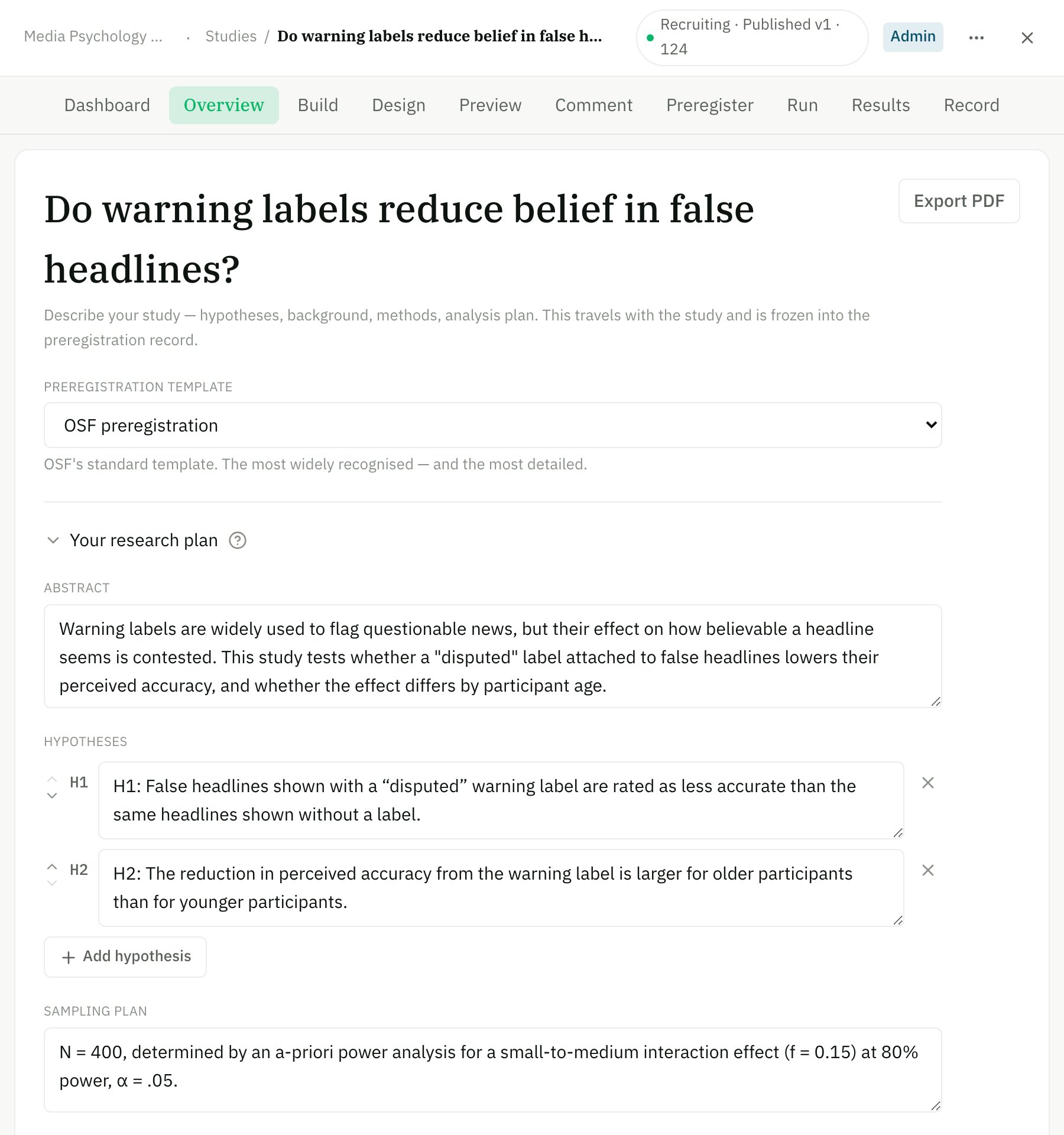
The Overview stage — your research plan, and the OSF template it files under.
Nothing on Overview is filed anywhere until you preregister. Until then it’s a draft you can keep editing.
Your plan fields
Which fields appear depends on the template you choose below — a replication, for example, adds fields for the original study and the target effect.
Choose an OSF preregistration template
OSF preregistrations follow a schema — a fixed set of questions. My Research Lab offers OSF’s own templates so your registration lands in the format reviewers expect. Pick one from the Preregistration template dropdown at the top of Overview:Open-ended
One free-text summary. The simplest option and the default.
OSF Preregistration
OSF’s standard template — the most widely recognised, and the most detailed (29 questions across Overview, Design, Sampling, Variables, and Analysis).
Pre-data-collection (OSF standard)
OSF’s short standard record that you planned before collecting — three questions.
Social psychology
The van ‘t Veer & Giner-Sorolla template.
Secondary data
For studies analysing data that already exists.
AsPredicted
AsPredicted’s eight short questions — filed to OSF, not to aspredicted.org.
Replication recipe
The Brandt et al. (2014) pre-registration recipe for direct replications.
Switching templates never destroys your answers. Each answer is stored against the OSF question it belongs to, so you can change your mind, and anything you already typed for a shared question is still there when you switch back.
Answer the template’s questions
Templates with structured questions (OSF Preregistration, Pre-data-collection, Social psychology, Secondary data, AsPredicted) show those questions live from OSF — in OSF’s own wording, order, and page grouping. The form is split into three sections so you always know whose question you’re answering:1
Your research plan
My Research Lab’s own fields (above) — the plan that travels with the study.
2
Mandatory for the template
The questions OSF marks as required, each labelled Needed.
3
Optional for the template
Everything else the template asks, collapsed by default.
Pull answers from your plan
Where an OSF question asks the same thing as one of your plan fields, a “Use these & edit” action offers to copy your plan text in as an editable starting draft — you review and adjust it before it means anything.- Research questions or hypotheses ← your Hypotheses
- Manipulated variables ← your independent variables
- Measured variables ← your dependent variables
- Sample size and statistical-model questions ← your sampling and analysis plans
One question is never pre-filled: OSF’s “Foreknowledge of data” certification. It asks whether any data exists anywhere — a claim only you can make — so it’s always answered by hand.
The readiness check
When you open the Preregister stage, a single Readiness check summarises everything standing between you and filing — methodological lint on your design, and any mandatory OSF questions still unanswered, named individually with a link straight to them.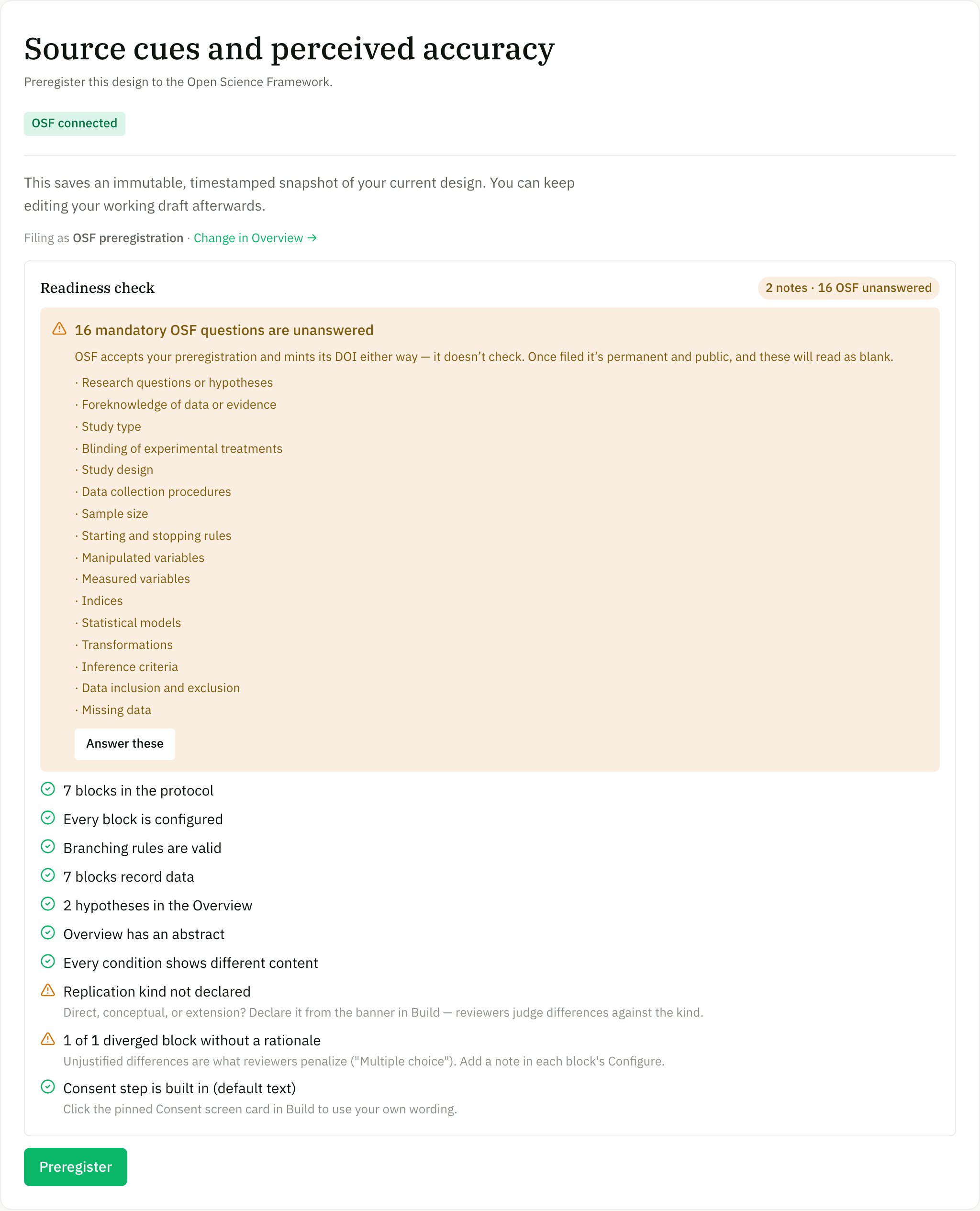
One Readiness check on Preregister — methodological lint plus any unanswered mandatory OSF questions, named.